



Most people run a union operation, get twice the features they expected, and then spend an hour cleaning it up. They should have used clip.
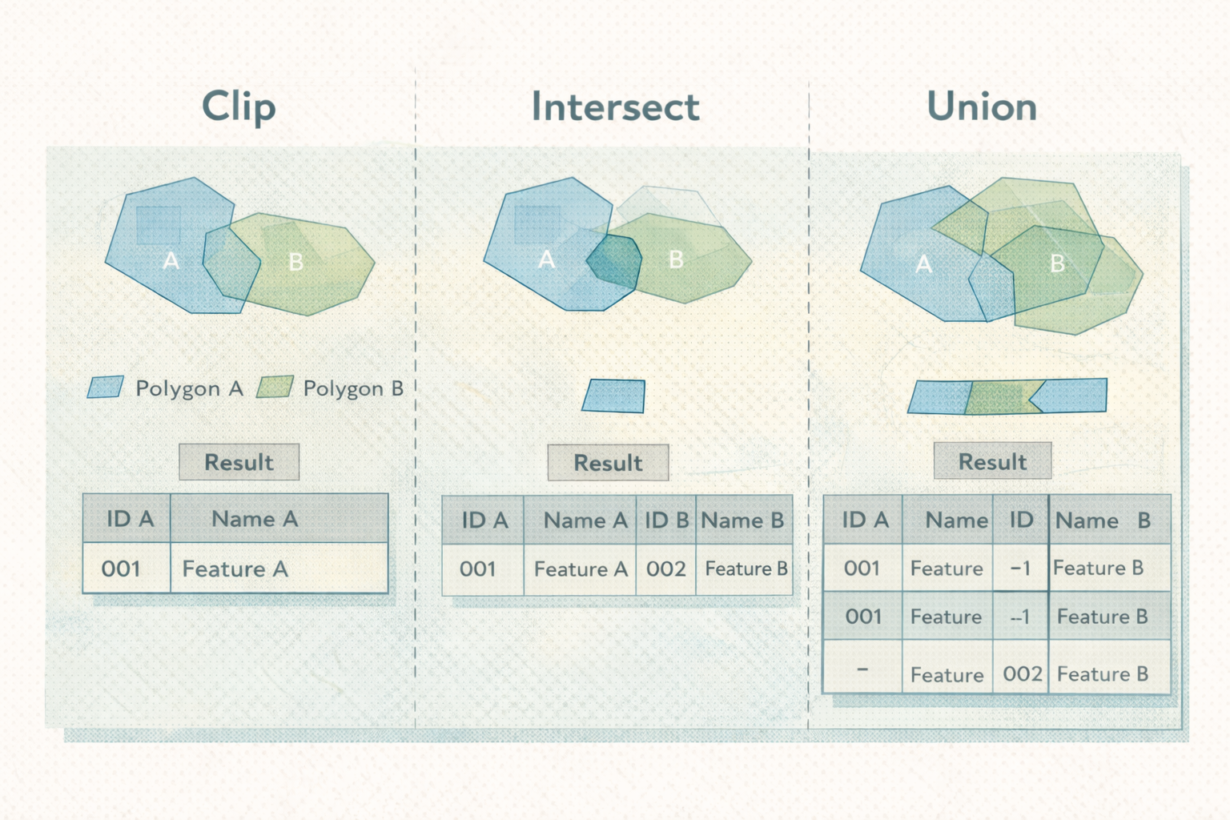
Clip uses one layer as a mask. It cuts features from the input layer to the boundary of the clipping layer and returns only the input features (clipped). Input attributes are preserved. Output is simple. Clip a building layer to a neighborhood boundary? You get buildings, nothing else, bounded by the neighborhood.
Intersect returns only the overlapping geometry from both layers and combines attributes from both. It’s a true overlay—spatial and tabular merge. Intersect a zoning layer with a floodplain? You get the areas where both overlap, with attributes from zoning and attributes from floodplain in the same row. Smaller output than union, richer attributes than clip.
Union returns all geometry from both layers, splitting features wherever they overlap. It’s the heaviest operation. Union a zoning layer with a floodplain? You get all zone boundaries plus all floodplain boundaries, every piece split at intersections. Output explodes. Attributes from both tables are carried through, often creating nulls. Rarely justified.
The mistake: union is treated as a default. People run it without asking if they actually need it.
The rule: Clip when you only need geometry from one layer. Intersect when you need overlapping areas with attributes from both. Union only when you genuinely need every boundary split by both layers (rare). Clip first, then decide if you need more. Most analysis stops at clip or intersect. Union is heavier and slower. Don’t use it unless you can explain why.
Whenever you’re ready, here are 4 ways I can help you grow in GIS & spatial data:
Spatial Lab – My private community where GIS professionals, data engineers, and analysts connect, swap workflows, and build repeatable systems together.
Modern GIS Accelerator – A guided program to help you break out of legacy GIS habits and learn modern, scalable workflows.
Career Compass – A career-focused program designed to help GIS pros navigate the job market, sharpen their pitch, and find roles beyond traditional GIS paths.
Sponsorship: Interested in sponsoring this newsletter (or other content)? Learn more here and fill out the form to get in touch!