


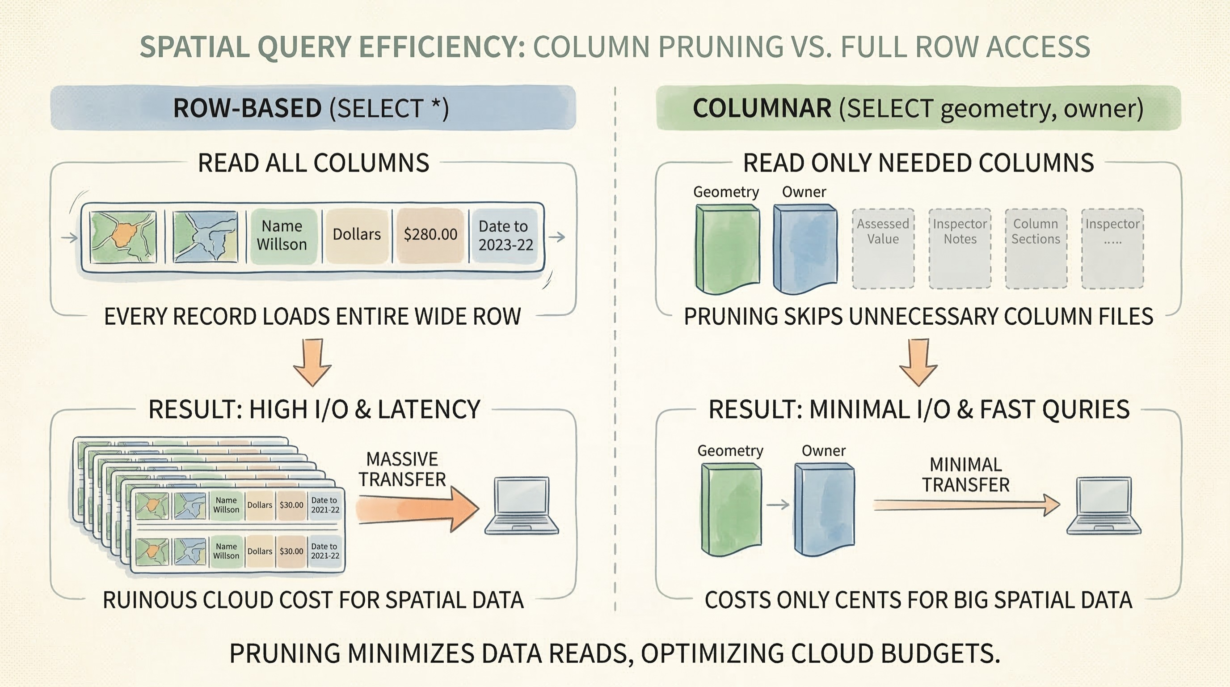

Column pruning is the difference between a query that costs cents and one that costs hundreds of dollars. In columnar storage, skipping unnecessary columns means not reading them from disk. In cloud environments, that’s the primary cost lever you control.
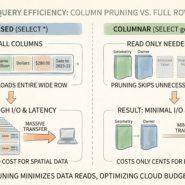
Columnar formats physically separate columns. GeoParquet stores geometry in one column file, owner names in another, assessed values in a third. Query “geometry AND owner for this region”? The engine reads exactly two column files. Ignore assessed values, insurance notes, and inspection history? Those files stay on S3. You pay bandwidth only for what you read.
Row-based databases can’t do this. Every record contains all columns. Fetch one geometry and you get the entire row—geometry plus all attributes, serialized together. A 100-byte geometry drags along 5KB of metadata. Multiply across millions of features, and you’re moving petabytes of wasted data.
Network I/O is the ultimate bottleneck. Cloud compute is cheap and fast. Bandwidth is expensive and slow. The only way to scale spatial analytics is to move fewer bytes. Column pruning is the mechanism.
The mistake: habitual SELECT * from desktop workflows. On a local SSD, fetching all columns costs nothing. On S3 with high latency and per-gigabyte charges, it’s ruinous.
Design wide, denormalized tables specifically to enable pruning. Store owner name, address, phone, and contact email together. Let analysts cherry-pick what they need. Never force them to fetch columns they won’t use.
The rule: Read only the columns you compute. If your spatial query pulls 100 columns to map two, your I/O costs are entirely self-inflicted. Column pruning turns cheap cloud storage into a high-performance modern GIS architecture.
Whenever you’re ready, here are 4 ways I can help you grow in GIS & spatial data:
Spatial Lab – My private community where GIS professionals, data engineers, and analysts connect, swap workflows, and build repeatable systems together.
Modern GIS Accelerator – A guided program to help you break out of legacy GIS habits and learn modern, scalable workflows.
Career Compass – A career-focused program designed to help GIS pros navigate the job market, sharpen their pitch, and find roles beyond traditional GIS paths.
Sponsorship: Interested in sponsoring this newsletter (or other content)? Learn more here and fill out the form to get in touch!